Is the SlideShare Downloader Free? Everything You Need to Know
Yes, the SlideShare Downloader Is Completely Free
SlidesGrabber’s SlideShare downloader costs nothing to use. There is no free trial that runs out, no credit system, and no upgrade prompt after a few downloads. Every feature is available from the moment you open the page.
- ✓ No payment required — ever
- ✓ No login or account needed
- ✓ Unlimited downloads, no daily cap
- ✓ PDF, PPT, and Images — all free
- ✓ No watermarks on downloaded files
- ✓ Works on mobile, tablet, and desktop
- ✓ Original quality — no compression
- ✓ Your data is never stored or tracked
Why SlideShare Itself Is No Longer Free to Download From
This is where a lot of people get confused. SlideShare the platform is free to browse — you can read and view any public presentation without paying. But downloading a presentation to your device is a different story.
SlideShare is owned by Scribd, which runs a subscription-based digital library. To download a presentation from SlideShare directly, you need an active Scribd subscription. As of 2026, that costs around $11.99 per month.
So the content is free to view, but not free to save. That is where a tool like SlidesGrabber comes in.
SlideShare Direct vs SlidesGrabber — What’s the Difference?
| Feature | SlideShare Direct | SlidesGrabber (Free Tool) |
|---|---|---|
| Download presentations | Paid subscription only | ✓ Free |
| Account required | Yes — Scribd account | ✓ No account needed |
| PDF format | Subscription only | ✓ Free |
| PPT format | Subscription only | ✓ Free |
| Images format | Not available | ✓ Free |
| Download limit | Depends on plan | ✓ Unlimited |
| Watermarks | None | ✓ None |
| Works on mobile | App required | ✓ Any browser |
What Exactly Do You Get for Free?
When we say the tool is free, here is a clear breakdown of what that means in practice.
All Three Download Formats at No Cost
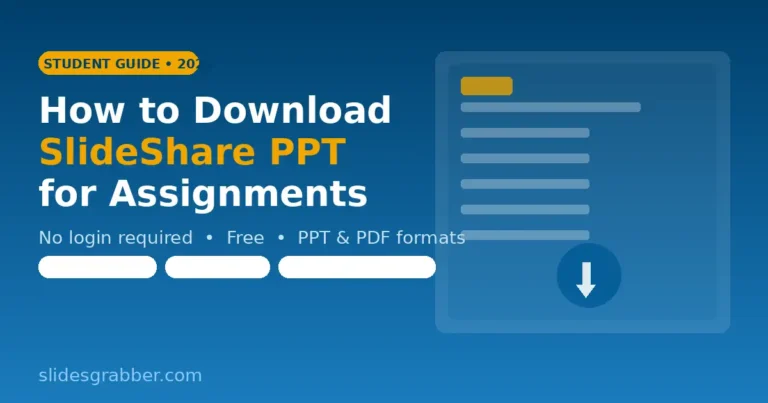
You can download any public SlideShare presentation in three formats — all free, all without restrictions:
- PDF — Best for reading, printing, and sharing. Looks identical to the original. Opens on any device.
- PPT — Editable PowerPoint file. Opens in Microsoft PowerPoint, Google Slides, WPS, and Keynote.
- Images (ZIP) — Each slide saved as a high-quality image. Useful when you need individual slides.
Unlimited Downloads With No Cap
There is no daily limit, no session limit, and no monthly quota. You can download one presentation or one hundred — the tool works the same either way. There is no point where it asks you to pay or slow down.
No Account on Any Platform
You do not need a SlideShare account, a Scribd account, or an account on SlidesGrabber. The tool works completely anonymously. Paste the URL, choose the format, click download — that is it.
Original Quality, No Watermarks
The file you download is the same quality as what is on SlideShare. No compression, no quality loss, and no watermarks or branding added. The presentation looks exactly as the original author uploaded it.
How to Download a SlideShare Presentation for Free
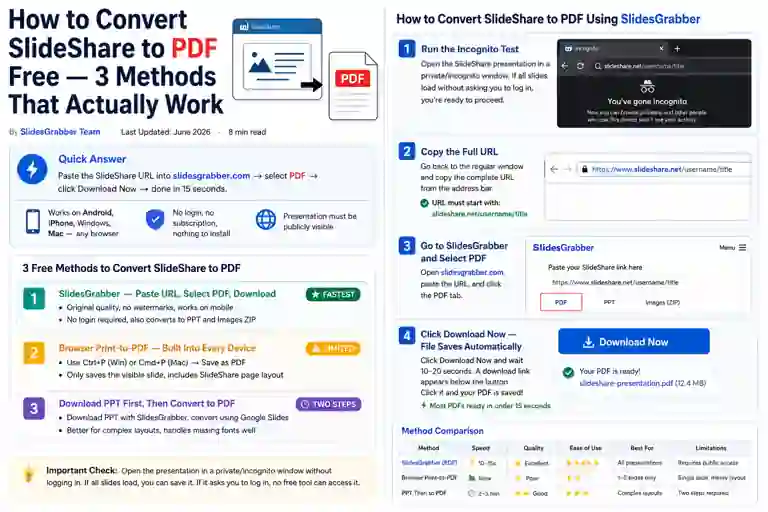
The process takes under a minute. Here is how it works step by step.
-
Open the presentation on SlideShare
Go to slideshare.net and find the presentation you want. Before downloading, open it in a private or incognito browser window. If you can read it fully without logging in, it can be downloaded free.
-
Copy the URL from the address bar
Click on your browser’s address bar and copy the full link. Do not copy from a share button or Google result — copy directly from the address bar to avoid broken links.
-
Paste the URL into SlidesGrabber
Go to slidesgrabber.com, paste the link into the input box at the top of the page.
-
Choose your format
Select PDF, PPT, or Images depending on what you need the file for. If you are unsure, PDF is the safest choice — it works on every device.
-
Download and save
Click the Download button. Your file will be ready in a few seconds and will save directly to your Downloads folder.
Is There Any Catch? What the Tool Cannot Do
Every honest review should mention limitations. Here is what this free tool cannot do:
- Private presentations cannot be downloaded. If a presentation requires a SlideShare login to view, the tool has no way to access it.
- Subscriber-only content is not accessible. Some presentations are locked behind the Scribd paywall. These cannot be saved by any free method.
- Embedded videos are not downloaded. If a presentation contains video content, only the slides are downloaded — not the video files.
- Very large files may take longer. Presentations with 100+ slides or heavy images may need 30–60 seconds to process.
Is It Safe to Use a Free SlideShare Downloader?
This is a fair question. Many free tools online come with risks — ads, forced sign-ups, or even malware. Here is what makes SlidesGrabber different:
- No personal data is collected at any point
- The URLs you paste are not saved or logged
- Downloaded files are not stored on the server after delivery
- No software installation required — runs entirely in the browser
- No spam links or unrelated tool promotions
The tool only accesses content that is already public — meaning anyone on the internet can view it without a login. It does not bypass any security, does not access private accounts, and does not interact with SlideShare’s paid systems.
Who Uses a Free SlideShare Downloader?
People use it for many different reasons. Here are the most common ones:
Students
Saving lecture slides, exam revision material, or subject-specific presentations for offline study. Especially useful before exams or in areas with unreliable internet.
Teachers and Educators
Downloading high-quality presentations to use in class or adapt for their own students. Saves time on content creation and gives access to well-structured materials on almost any topic.
Researchers
Archiving presentations from conferences, academic talks, and industry events before they are removed or go behind a paywall.
Professionals
Saving business presentations, market research slides, and industry reports for offline reference during meetings or travel.
Ready to Download a SlideShare Presentation?
Free, fast, and no login needed. Paste your SlideShare link and get your file in seconds.
Go to SlideShare Downloader →