Best SlideShare Presentations for Students (By Subject)
Best SlideShare Presentations for Students — Organized by Subject
A curated guide to finding and saving the most useful SlideShare decks across every major academic subject — with search tips, quality signals, and how to access them offline.
SlideShare has over 18 million presentations uploaded by professors, researchers, universities, companies, and subject experts — all available to browse for free. For students, this is one of the most underused educational resources on the internet.
The problem is not finding presentations. It is finding good ones. Search “marketing” on SlideShare and you get 400,000 results. Search “photosynthesis” and there are 60,000. Knowing what to look for — and what to skip — is the real skill.
This guide does two things: it gives you concrete search strategies and quality signals for finding genuinely useful presentations on SlideShare for your specific subject, and it shows you how to save the best ones offline so they are ready when you need them — even without an internet connection.
📑 Jump to Your Subject
Each subject section below gives you: the best search terms to use on SlideShare, what good presentations in that field look like, specific types of decks to look for, and quality signals that tell you whether a presentation is worth downloading. At the end, a step-by-step method for saving any presentation offline — free, no login.
💼 Business & Management
Business, MBA & Management
Business is one of SlideShare’s strongest categories. Companies like McKinsey, Deloitte, and HBR have shared presentations here, alongside hundreds of university MBA programs. The quality gap between good and bad business decks is wide — but the best ones are genuinely excellent study material.
Best Search Terms for Business Students
- “strategic management” site:slideshare.net — finds strong MBA-level strategy decks
- “business model canvas” SlideShare — dozens of excellent explanatory decks
- “SWOT analysis presentation” SlideShare — good for learning the format
- “marketing strategy PPT” SlideShare — practical business application decks
- “entrepreneurship SlideShare university” — adds credibility filter
Types of Business Presentations to Look For
Excellent for MBA students. Look for decks that use real company case studies — Apple, Amazon, Tesla. These are far more useful than purely theoretical presentations.
The Business Model Canvas has become essential in entrepreneurship courses. SlideShare has hundreds of high-quality explanatory decks, including official versions from Strategyzer.
The 4Ps, STP framework, and digital marketing overview decks are abundant and often excellent. University marketing departments frequently share lecture slide sets here.
Look for CFA-level or investment banking presentations covering DCF analysis, ratio analysis, and financial modeling. These are dense but excellent for finance students.
🔬 Science & Biology
Biology, Chemistry, Physics & General Science
Science presentations on SlideShare range from high school level biology diagrams to research-level biochemistry. The key is filtering by academic level and checking whether the content uses accurate diagrams rather than stock photos of test tubes.
Best Search Terms
- “cell biology lecture slides” SlideShare — finds proper university lecture decks
- “organic chemistry SlideShare university” — filters toward academic sources
- “human physiology PPT” — anatomy and physiology decks for health science students
- “genetics and heredity presentation” — strong visual decks available
- “thermodynamics lecture PPT university” — physics presentations
Photosynthesis, cellular respiration, mitosis, and meiosis all have excellent visual decks. Look for presentations from biology departments with clear, labeled diagrams — not clip-art illustrations.
Chemistry fundamentals are well-represented. The best decks use color-coded periodic tables and molecular diagrams. Prioritize presentations from university chemistry departments.
Physics concepts with worked examples are exceptionally useful. Look for decks that include practice problems and step-by-step worked solutions — these are the ones actually useful for exam prep.
⚙️ Engineering & Technology
Civil, Mechanical, Electrical & Software Engineering
Engineering is one of SlideShare’s strongest niches. Many engineering professors have uploaded full semester lecture sets. You can find complete course presentations for subjects like structural analysis, thermodynamics, digital circuits, and software design patterns.
Best Search Terms
- “structural analysis lecture notes PPT” — civil engineering
- “machine design SlideShare lecture” — mechanical engineering
- “digital electronics PPT university” — electrical engineering
- “software engineering design patterns PPT” — software engineering
- “fluid mechanics lecture slides” — core engineering subject
Civil engineering lecture sets on SlideShare are often full semester uploads — covering beams, trusses, and frame analysis with worked problems. Some are from IIT professors, which signals high quality.
Mechanical engineering presentations covering thermodynamic cycles, entropy, and heat exchanger design. Best ones include P-V diagrams and worked numerical examples.
UML diagrams, MVC architecture, and design pattern overviews from software engineering programs. Particularly useful for CS students taking software engineering courses.
🩺 Medicine & Health Sciences
Medicine, Nursing, Pharmacy & Public Health
Medical presentations on SlideShare are widely used by medical students globally — particularly for clinical subjects, pharmacology, and anatomy. The best ones come from medical colleges and teaching hospitals.
Always verify medical content against your official textbooks and course materials. SlideShare presentations can contain outdated drug dosages, diagnostic criteria, or treatment guidelines. Use them for concept overview — not as clinical reference.
Best Search Terms
- “pharmacology lecture slides” SlideShare — drug classes and mechanisms
- “anatomy lecture PPT medical college” — detailed anatomical decks
- “pathology SlideShare MBBS” — disease process presentations
- “public health epidemiology PPT” — public health presentations
- “nursing care plan presentation” — for nursing students
Antibiotics, antihypertensives, antidiabetics, and CNS drugs all have dedicated presentation sets. Best decks include mechanism of action diagrams and drug comparison tables.
Cardiovascular, respiratory, nervous system anatomy decks with labeled diagrams. Look for presentations from teaching hospitals — they tend to have clinical correlation included, which is more useful than purely academic anatomy.
Public health presentations covering study design, disease surveillance, and health indicators. Often from public health institutes with real data included.
📜 History & Social Studies
World History, Political Science & Social Studies
History presentations on SlideShare are especially useful for visual timelines, map-based presentations, and cause-and-effect analyses. They work well as supplementary material alongside textbooks — particularly for understanding complex historical events in sequence.
Best Search Terms
- “World War 2 causes and effects PPT” — detailed event analysis decks
- “cold war timeline presentation” — visual chronology decks
- “industrial revolution SlideShare” — economic and social change decks
- “colonialism decolonization PPT university” — academic level presentations
- “French Revolution causes consequences SlideShare” — highly searched topic
Comprehensive timeline decks covering WWI and WWII with maps, political cartoons, and statistical data. Best for visual learners who need to understand the chain of events rather than just dates.
Excellent for A-Level and undergraduate students. Look for decks that include primary source quotes, policy documents, and comparison of US vs Soviet perspectives — these are richer than simple event lists.
Visual presentations with archaeological images, maps, and cultural comparisons. Particularly good for younger students as the visual approach makes complex ancient history more digestible.
💻 Computer Science & IT
Programming, Data Science, Networking & AI
Computer science is arguably SlideShare’s second strongest category after business. Industry professionals, university professors, and tech companies have shared thousands of high-quality presentations on everything from basic Python to machine learning architectures.
Best Search Terms
- “data structures algorithms PPT lecture” — CS fundamentals
- “machine learning introduction SlideShare” — ML overview decks
- “database management system lecture slides” — DBMS for CS students
- “computer networks OSI model PPT” — networking fundamentals
- “artificial intelligence deep learning presentation university” — AI presentations
Sorting algorithms, trees, graphs, and dynamic programming all have strong visual explanations on SlideShare. Particularly useful because code alone is hard to understand — slide-based visual walkthroughs clarify logic faster.
Andrew Ng’s Stanford ML presentations were uploaded to SlideShare and remain among the most viewed CS decks ever. Beyond these, there are hundreds of university-level ML overview decks worth saving.
ER diagrams, normalization, query optimization, and database design all have excellent lecture decks. Best ones include SQL query examples alongside the theory slides.
📈 Economics & Finance
Micro & Macroeconomics, Finance & Accounting
Economics presentations on SlideShare are excellent for visual learners — supply and demand curves, GDP charts, and monetary policy diagrams are often clearer in slide format than in textbooks. Finance and accounting presentations from professional bodies like CFA Institute and ACCA are also widely available.
Best Search Terms
- “macroeconomics lecture slides GDP inflation”
- “microeconomics supply demand elasticity PPT”
- “financial management lecture notes SlideShare”
- “monetary policy central bank presentation”
- “accounting principles IFRS PPT university”
Great for A-Level and first-year university economics. The best decks use real data charts from IMF or World Bank — much more engaging than generic textbook diagrams.
Presentations covering liquidity, profitability, leverage, and valuation multiples. Investment banking training decks from financial firms are particularly comprehensive.
🧠 Psychology
Psychology, Behavioral Science & Mental Health
Psychology is one of the most-searched subjects on SlideShare by students. Theoretical frameworks, research study summaries, and clinical psychology case presentations are all well represented.
Best Search Terms
- “Maslow hierarchy of needs presentation”
- “cognitive behavioral therapy CBT SlideShare”
- “developmental psychology Piaget Vygotsky PPT”
- “social psychology lecture slides university”
- “abnormal psychology DSM presentation”
Freud, Erikson, Maslow, and Piaget all have multiple high-quality dedicated decks. Best for introductory psychology courses where you need a clear, structured overview of each theorist.
Experimental design, sampling methods, statistical tests, and APA format presentations. Extremely useful when writing a research paper — these decks often explain methodology more clearly than textbooks.
⚖️ Law & Political Science
Law, Constitutional Studies & Political Science
Law presentations on SlideShare work best for conceptual understanding — types of law, constitutional frameworks, international law principles, and legal reasoning methods. They are less reliable for jurisdiction-specific case law, which changes frequently.
Best Search Terms
- “contract law lecture slides LLB”
- “constitutional law presentation university”
- “international human rights law PPT”
- “political science comparative politics SlideShare”
- “criminal law elements offense presentation”
Offer, acceptance, consideration, breach, and remedies are well-covered in LLB lecture decks. Look for presentations that use case study examples — these are more useful for exams than pure theory.
Democracy vs authoritarianism, presidential vs parliamentary systems, and federal vs unitary state comparisons — all well represented with comparison tables and country examples.
🏫 Education & Teaching
Education Studies, Pedagogy & Teacher Training
SlideShare is widely used by teacher trainers and education researchers. If you are studying education, PGCE, or teacher training, you will find excellent presentations on learning theories, curriculum design, and classroom management.
Best Search Terms
- “learning theories Bloom’s taxonomy presentation”
- “curriculum design lesson planning PPT”
- “inclusive education differentiated learning SlideShare”
- “classroom management strategies presentation”
- “educational psychology Vygotsky zone of proximal development”
Visual presentations of Bloom’s revised taxonomy are excellent for education students who need to understand how to structure learning objectives at different cognitive levels.
🌍 Environment & Climate Science
Environmental Science, Climate Change & Sustainability
This is one of SlideShare’s fastest-growing categories. With climate change becoming a core subject in universities globally, there are now thousands of high-quality presentations from environmental researchers, NGOs like WWF and UNEP, and university geography departments.
Best Search Terms
- “climate change causes effects solutions PPT”
- “renewable energy solar wind presentation university”
- “biodiversity loss conservation SlideShare”
- “sustainable development goals SDG presentation”
- “carbon footprint greenhouse effect PPT”
IPCC-referenced presentations from universities and research institutes. Look for decks that cite specific temperature data and policy frameworks — these are more academically useful than general awareness decks.
UN Sustainable Development Goals presentations — many from official UN agencies and development organizations. Very useful for public policy, development economics, and international relations students.
🎨 Design, Marketing & Communications
Graphic Design, Digital Marketing & Communications
Design and marketing presentations on SlideShare are useful both for content and for presentation design inspiration. Some of the most beautifully designed SlideShare decks come from this category — agency portfolios, design principles guides, and brand strategy presentations.
Best Search Terms
- “content marketing strategy presentation 2024 2025”
- “UX design principles SlideShare”
- “social media marketing PPT university”
- “brand identity design presentation”
- “SEO digital marketing overview SlideShare”
SEO, SEM, social media, email marketing, and content marketing overview decks. Look for presentations from marketing agencies or university marketing programs with real campaign data included.
User research, wireframing, usability testing, and design systems — all well represented. Many design agencies share these openly as thought leadership content, which makes the quality unusually high for a free resource.
Found a Useful Presentation? Save It Before You Lose It
SlideShare links sometimes disappear when uploaders delete their accounts. Download any presentation to PDF or PPT using SlidesGrabber — free, no login, in under 30 seconds.
📥 Save Presentations Free →🔍 How to Find Good SlideShare Presentations (Quality Signals)
Knowing your subject is one thing. Knowing whether a specific presentation is worth your time is another. Here are the signals that separate genuinely useful presentations from the low-quality ones:
Green Flags — Look For These
- Uploader from a university, hospital, or recognised institution — check the username and profile. “MIT OpenCourseWare”, “Stanford GSB”, or “WHO” uploaders are almost always reliable.
- High view count (100,000+) with positive comments — peer filtering at scale. If thousands of students found it useful, it is probably good.
- References cited at the end — academic presentations that cite their sources are far more trustworthy than those that do not.
- Real data, charts, and diagrams — not stock photos. A biology presentation with actual labeled diagrams beats one with clipart every time.
- Recent upload date — for fast-moving subjects like AI, digital marketing, or public health, a 2023–2026 deck is far more useful than a 2015 one.
- Detailed slide count (40+ slides) — thin 10-slide presentations are rarely substantive. A 60-slide lecture deck has far more actual content.
Red Flags — Skip These
- No author name or institutional affiliation visible
- Very old upload date (pre-2015) for technical or scientific subjects
- Lots of stock photos with minimal actual content
- No references or sources cited anywhere in the deck
- Very low slide count (under 10 slides) for a supposedly comprehensive topic
- Blurry or pixelated images — often indicates a scan of a printed document
📥 How to Save SlideShare Presentations Offline
Once you find a presentation worth keeping, you want to save it before the link disappears or you forget which presentation it was. Here is the fastest method:
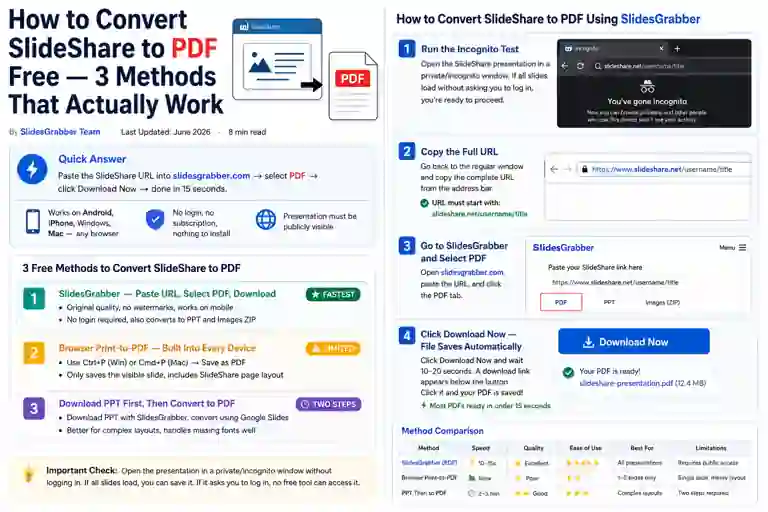
Save Any Public SlideShare Presentation in 4 Steps
Open the SlideShare presentation and confirm you can see all slides without a login prompt.
Copy the full URL from your browser’s address bar (not from Google search results).
Go to slidesgrabber.com and paste the URL into the input box.
Select PDF (for reading/printing) or PPT (for editing) and click Download. File ready in under 15 seconds.
Which Format to Choose When Saving
- PDF — For 90% of cases. Smaller file, exact layout, works on every device without extra software. Best for exam study material you just need to read.
- PPT — If you need to edit the slides, add your own notes directly into the deck, or adapt the structure for your own presentation.
- Images ZIP — If you need specific slides as individual images for a report or assignment.
Create a folder on your device (or Google Drive/iCloud) organized by subject. As you find good presentations throughout the semester, download and save them there. By exam time, you have a curated offline library of exactly the materials you need — no searching required.
💡 Pro Tips for Students Using SlideShare
Use Google to Search SlideShare
Add “site:slideshare.net” to any Google search. Google’s search is far better than SlideShare’s own search bar for finding high-quality, relevant content.
Filter by Date for Technical Topics
Use Google’s “Tools → Any time → Past year” filter when searching for AI, technology, or public health presentations. Outdated technical content can mislead more than help.
Use Slides as Source Maps
The best slides cite their sources. When you find a good SlideShare deck, check the last few slides for references. These point you to the primary sources — journal articles, books, and reports worth reading in full.
Download Before Links Die
SlideShare presentations disappear regularly when uploaders delete accounts. Save every useful presentation as PDF the moment you find it — do not rely on saving the link alone.
Cite Properly When Using as Reference
SlideShare presentations are citable academic sources. Use APA: Author. (Year). Title [SlideShare presentation]. SlideShare. URL. Your institution likely accepts this as a reference.
Share With Study Groups
Found an excellent presentation? Download it and share via WhatsApp or email with your study group. One good find can help the whole group — and group members can return the favour with presentations they find.
Start Building Your Study Library Today
Find a great SlideShare presentation for your subject → paste the URL into SlidesGrabber → download as PDF in seconds. Free, no login, no limits.
📚 Download Presentations Free →Frequently Asked Questions
Final Thoughts
SlideShare’s 18 million presentations represent one of the largest collections of free educational content on the internet. The challenge has never been finding presentations — it has always been finding good ones efficiently and being able to access them when you need them.
The subject-by-subject search strategies in this guide give you a reliable starting point for every major academic area. The quality signals — institutional uploaders, citation at the end, real data and diagrams, high view count — help you filter quickly without wasting time on low-quality decks.
And once you find something genuinely useful: download it. Save it offline. Add it to your study library folder. SlideShare links disappear more often than you might expect. A presentation that was there when you found it may not be there when you need it at 2am before an exam.
SlidesGrabber makes that last step — the saving — free, fast, and requiring no account. Copy the URL, paste it, choose PDF, done. It takes less time than reading this sentence out loud.