How Students Can Download SlideShare PPT for Assignments & Projects
How Students Can Download SlideShare PPT for Assignments & Projects (2026 Guide)
Everything you need to know about using SlideShare presentations for research, studying, and academic work — the right way.
A few weeks before my cousin’s final project presentation, she was desperately searching for ideas on how to structure her slides. A Google search landed her on SlideShare — and within 20 minutes, she had references from three different university-level presentations, all on her topic. The problem? She was in a place with unreliable Wi-Fi, and she couldn’t keep switching tabs to re-read them.
That situation is more common than you think. Whether you are a university student working on a research paper, a school student preparing a science project, or a teacher building a lesson plan — SlideShare is probably already part of your workflow. It is one of the largest collections of free educational presentations on the internet, covering topics from machine learning to medieval history.
But browsing it online has limits. Slides disappear, Wi-Fi fails, and sometimes you just want to read at your own pace without a browser open. This guide covers everything: why SlideShare is so useful for academic work, how to download SlideShare PPT files properly, how to cite them, and how to use them ethically.
Why Students Use SlideShare Presentations for Learning
If you have never explored SlideShare seriously, you might be missing out. The platform hosts millions of presentations — many from universities, professors, research institutes, and industry professionals — all available for free.
Visual Learning
Slides condense dense topics into diagrams, charts, and bullet points — easier to absorb than a 20-page PDF.
Presentation Inspiration
Seeing how experts structure their slides helps you plan your own. Layout, flow, colour choices — all learnable by example.
Research Ideas
Academic presentations often include references, stats, and findings you can trace back to primary sources.
Study Materials
Many professors upload their own lecture slides here. Find them before exam season and you are ahead of the game.
SlideShare presentations for students work particularly well for subjects like business, engineering, medicine, social sciences, and computer science — areas where visual explanations and real-world case studies make a huge difference in understanding.
Benefits of Downloading SlideShare PPT Files
Viewing presentations online is convenient, but downloading them gives you something more useful: ownership of your study material.
- 📶Offline access, always. Library Wi-Fi cuts out. Campus networks get congested. A downloaded file is available regardless of your internet situation — on the train, in a hostel room, anywhere.
- ⏱️Saves research time. Instead of opening five tabs and losing your place, you can work from a single file saved to your desktop or phone.
- ✏️Add your own notes. PDF and PPT formats let you annotate directly. Highlight, comment, or restructure slides to fit your assignment’s angle.
- 🗂️Build a personal study library. Over a semester, downloading key presentations lets you create a well-organised folder of resources that you actually return to.
- 🖨️Print specific slides. Not everything needs to be on a screen. Downloaded PDF slides are easy to print for revision or group study sessions.
The ability to save SlideShare slides as PDF is especially useful during exam preparation — you can compile multiple presentations into one reading session without browser distractions.
How to Download SlideShare PPT Without Login
SlideShare’s native download feature requires an account, and even then, not all presentations are downloadable. This is where an online downloader tool becomes useful — especially for students who need quick access without creating accounts on every platform.
Here is a step-by-step walkthrough:
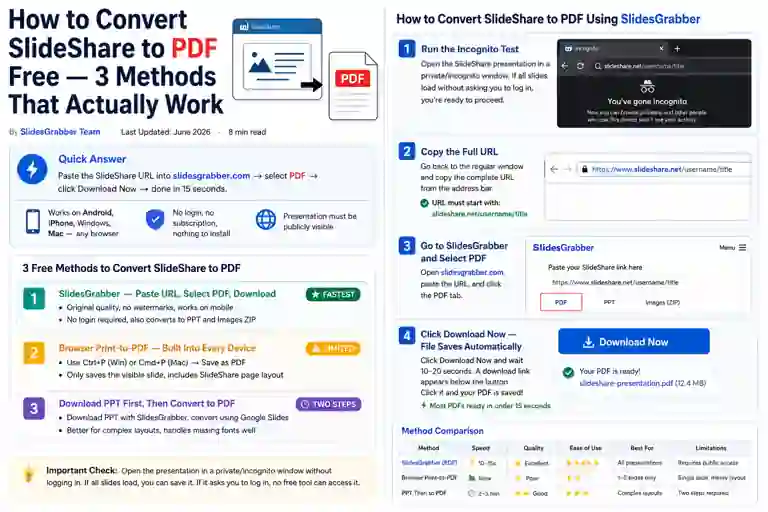
Go to slideshare.net and search for your topic. Look at the slide count, the uploader’s profile, and the date — these help you judge quality before downloading anything.
Once you find a useful presentation, copy the full URL from your browser’s address bar. It usually looks like: slideshare.net/username/presentation-title. Make sure the presentation is publicly viewable.
Head over to slidesgrabber.com — our SlideShare downloader helps users save presentations quickly without login, and it works on any device. Paste the copied URL into the input box.
Select either PPT (if you want to edit the file) or PDF (if you just need to read or print). Click Download. Most files are ready in under 15 seconds. Save the file to your device and you are done.
💡 Quick tip: If you plan to reference the presentation later, rename the file immediately after downloading. Use something like Topic_AuthorName_Year.pdf so you can find it when writing your bibliography.
Download PPT without login is one of the most-searched requests by students, and tools like this exist precisely because the official platform does not always make it straightforward. The key is using such tools only for publicly available content — which is all this tool accesses.
Need a SlideShare presentation for your assignment right now? No account, no waiting — just paste the link and download in seconds.
Try SlidesGrabber Free →How Students Can Use SlideShare Slides for Assignments and Projects
Downloading a presentation is just the beginning. The real value comes from how you use that material. Here is how to get genuine academic value from SlideShare content — without simply copying slides into your own work.
As a starting point for research
Presentations often include references to studies, reports, and books that you can trace back to their original source. A slide that shows a statistic is not your final source — but it can direct you to a journal article or dataset that is. Think of SlideShare as a roadmap, not a destination.
For structuring your own presentation
If you are preparing a project on climate change and you find a well-structured deck from a university researcher, study it: how many slides did they use per section? How did they open? What kind of visuals supported their points? This is legitimate inspiration, not copying — the same way architects study other buildings.
To understand unfamiliar concepts quickly
Textbooks explain concepts thoroughly but slowly. A good SlideShare deck on the same topic can give you the overview in five minutes, which helps you know which chapters of the textbook actually matter for your assignment.
As a reference — properly cited
Yes, you can cite a SlideShare presentation as a source. Many educators accept it, particularly when the uploader is a credible authority (a professor, a well-known institution, an industry expert). More on how to do this correctly in the next section.
How to Properly Cite SlideShare Presentations
Using information without crediting the source is plagiarism — even if it came from a free presentation online. Fortunately, citing SlideShare content is straightforward.
APA Format (7th edition)
Author Last Name, First Initial. (Year, Month Day). Presentation title: Subtitle if any [SlideShare presentation]. SlideShare. https://www.slideshare.net/username/presentation-url
Ahmed, S. (2024, March 12). Introduction to machine learning: Concepts and applications [SlideShare presentation]. SlideShare. https://www.slideshare.net/sahmedml/intro-to-ml
MLA Format (9th edition)
Author Last Name, First Name. “Presentation Title.” SlideShare, Day Month Year, www.slideshare.net/username/presentation-url. Accessed Day Month Year.
Ahmed, Sara. “Introduction to Machine Learning: Concepts and Applications.” SlideShare, 12 Mar. 2024, www.slideshare.net/sahmedml/intro-to-ml. Accessed 10 June 2026.
If the author’s real name is not listed, use the username. If the exact upload date is not visible, use the year. When in doubt, follow your institution’s specific citation guidelines or ask your supervisor.
Important Tips Before Using Downloaded Slides
Not all SlideShare presentations are created equal. Before you build an assignment around a deck you have found, keep these points in mind.
- 🔍Check the source quality. Anyone can upload to SlideShare. Look for presentations from universities, verified organisations, or professionals with credentials. A deck with no author name and no references deserves healthy scepticism.
- ⚖️Respect copyright. Most presentations carry default copyright, even if they are publicly accessible. Downloading for personal study is generally fine. Reproducing slides in your own published work or redistributing files is a different matter — check the licence or ask the creator.
- 🎓Add your own analysis. Using a slide as a reference is academic. Copying its content directly into your assignment and passing it off as your own reasoning is not. Always process the information through your own thinking before it enters your work.
- 📅Check the date. A presentation from 2015 on digital marketing or artificial intelligence may contain outdated information. For fast-moving fields, prioritise recent uploads.
- ✅Verify statistics. If a slide includes a statistic, trace it back to the original study or report before repeating it in your work. Slides sometimes simplify or misquote data without meaning to.
Frequently Asked Questions
Final Thoughts
SlideShare is genuinely one of the best free educational resources available to students today — and it tends to be underused simply because people do not know how to access it efficiently. Being able to download SlideShare presentations offline changes how you study: you can review material on your own schedule, annotate files, and build up a personal library of resources that actually sticks.
The process is simple: find the presentation, copy the URL, use a downloader tool, and save in the format that works for you. What matters more, though, is what you do with those files. Use them to deepen your understanding, trace original sources, structure your thinking, and produce your own original work — not as a shortcut, but as a foundation.
Done responsibly, downloading and using SlideShare presentations is a completely legitimate and genuinely useful part of academic research. Just remember to cite your sources, verify your facts, and always add something of your own.
Ready to try it? Visit SlidesGrabber.com — no account needed, no cost, no hassle.